Your AI Agent,
In Your Pocket
Home service business owners are never at a desk - they're in vans and on job sites. The Voiceyfy mobile app puts live call activity, bookings, recordings, and revenue insights in your pocket. No voice AI competitor has a native app.
← All FeaturesTake the tour
Eleven screens run your whole business
Tap a screen to see it - or swipe the phone. This is the real app, free with every plan.
1 / 10Dashboard
Your whole operation on one screen
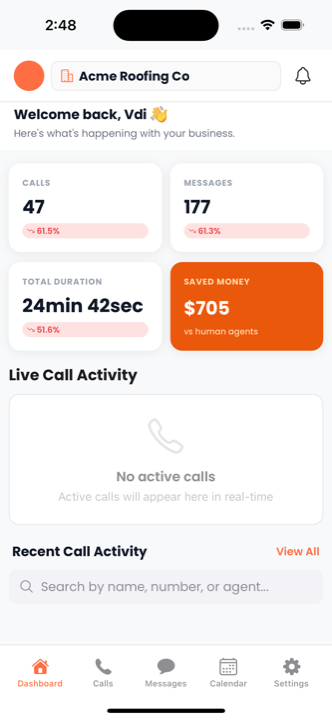
Open the app and the numbers are already there - calls handled, messages exchanged, total talk time, and what the AI saved you against human agents. Live calls surface in the same view the moment one connects.
- Calls, messages, talk time, and money saved up top
- Each figure trended against the period before it
- Live call activity appears in real time as calls land
Open the app and the numbers are already there - calls handled, messages exchanged, total talk time, and what the AI saved you against human agents. Live calls surface in the same view the moment one connects.
- Calls, messages, talk time, and money saved up top
- Each figure trended against the period before it
- Live call activity appears in real time as calls land
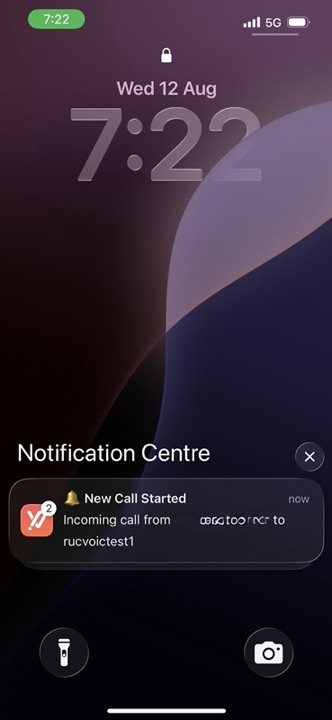
The moment a call starts, the app pushes it to your lock screen - who is calling and which agent picked it up. You find out a call is happening while it is still happening, not at the end of the day.
- Push the second a call starts, not after it ends
- Caller and answering agent right on the lock screen
- Tap through to watch the call live
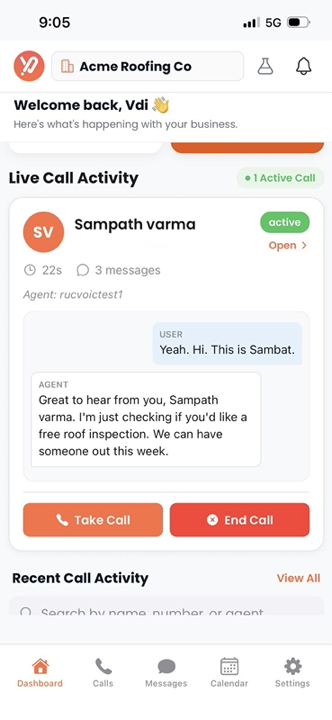
An active call opens on the dashboard with the conversation building line by line underneath it. If the AI is out of its depth, Take Call puts you on the line - or End Call stops it.
- Active calls counted and opened from the dashboard
- The exchange updates live, turn by turn
- Take Call to step in, End Call to cut it short
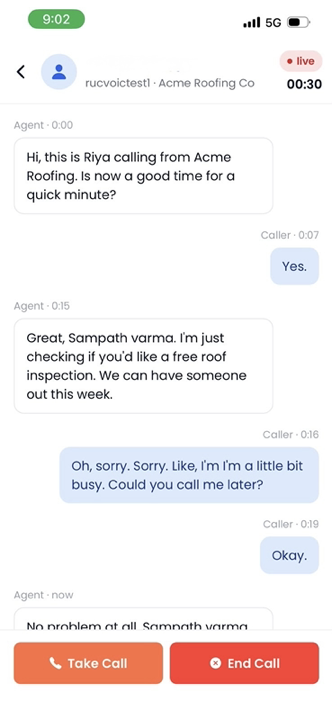
Open the live call and every turn is there with a timestamp - what your agent said, what the caller answered, and how long into the call each one landed. Read it in seconds and decide whether to step in.
- Agent and caller turns timestamped from the start
- A live timer counts the call as you read
- Take Call or End Call without leaving the transcript
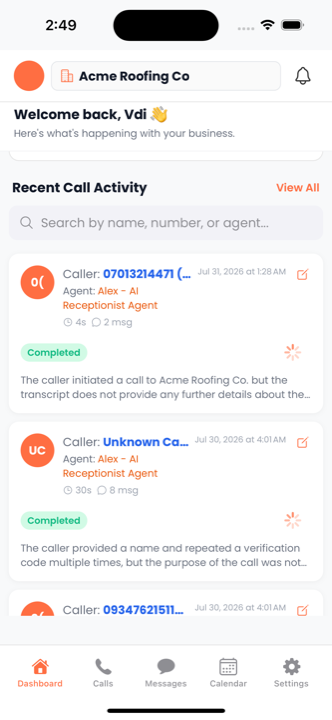
Every completed call is written up by the AI and dropped straight onto your home feed - who called, which agent took it, how long it ran, and a plain-English recap of what was said.
- AI-written recap on every call, no playback needed
- Caller, agent, duration, and message count on the card
- Search the feed by name, number, or agent
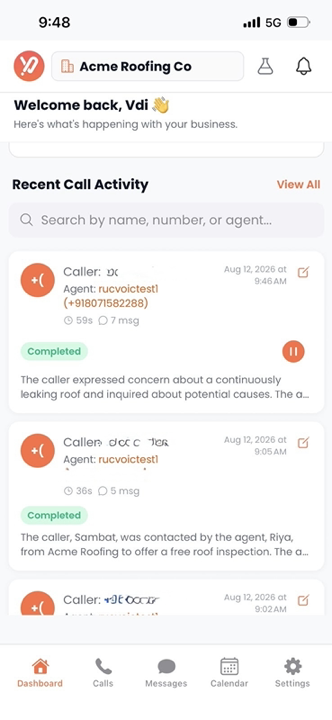
Every call on the feed carries its recording. Hit play on the card and it starts there - no downloads, no separate player, no jumping to the web dashboard to hear how a call actually went.
- Play and pause a recording from the call card
- The written recap sits under the call you are hearing
- Works over cellular, straight from the feed
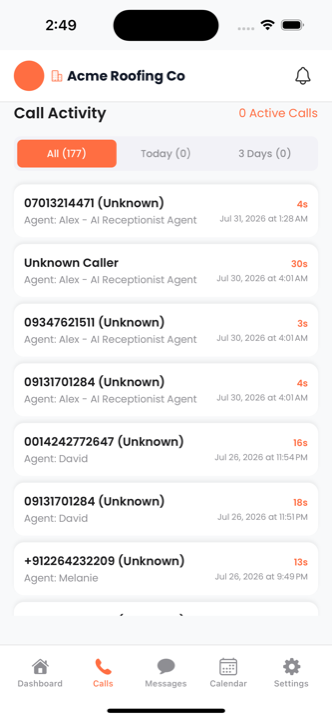
The full call log, with active calls counted at the top. Narrow it to today or the last three days when you only care about what just happened, and tap any row to open the call.
- Active call count always visible in the header
- All, today, and three-day filters with live counts
- Caller, agent, duration, and timestamp on every row
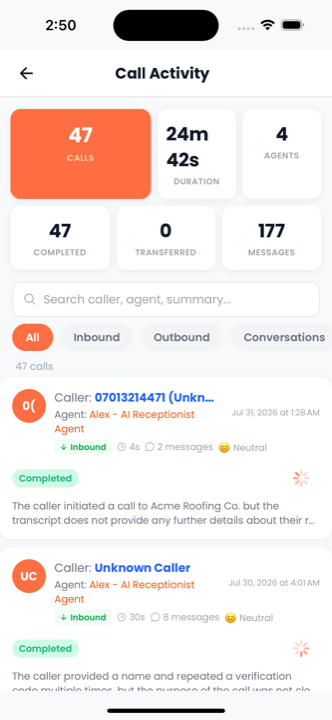
Calls, total duration, agents in play, completed versus transferred, and messages exchanged - then cut the same list by inbound, outbound, or conversation, with a sentiment read on each one.
- Completed and transferred counts side by side
- Inbound, outbound, and conversation filters
- Sentiment scored on every call in the list
Jobs the agent booked land on your calendar without anyone typing them in. Check today at a glance, then switch between month, week, and day to see how the diary is filling up.
- Today's bookings summarised at the top of the screen
- Month, week, and day views on one toggle
- Days carrying bookings marked on the grid
Update the business profile the agent speaks from, top up the credits that pay for calls, fix your own details, and work back through your notification history - all from the phone.
- Buy call credits without opening the web dashboard
- Edit the business profile the AI answers with
- Full notification history, kept in one place
Every screen, end to end
The whole app in one scroll - from the sign-in screen, through a call landing live on your lock screen, to the recordings, the bookings, and the billing.
Dashboard
Your whole operation on one screen
Open the app and the numbers are already there - calls handled, messages exchanged, total talk time, and what the AI saved you against human agents. Live calls surface in the same view the moment one connects.
Alerts
You know before you pick up the phone
The moment a call starts, the app pushes it to your lock screen - who is calling and which agent picked it up. You find out a call is happening while it is still happening, not at the end of the day.
Live calls
Watch a call while it is still running
An active call opens on the dashboard with the conversation building line by line underneath it. If the AI is out of its depth, Take Call puts you on the line - or End Call stops it.
Transcript
The whole conversation, as it is spoken
Open the live call and every turn is there with a timestamp - what your agent said, what the caller answered, and how long into the call each one landed. Read it in seconds and decide whether to step in.
Summaries
Read what happened, not the transcript
Every completed call is written up by the AI and dropped straight onto your home feed - who called, which agent took it, how long it ran, and a plain-English recap of what was said.
Recordings
Play the call back from the same feed
Every call on the feed carries its recording. Hit play on the card and it starts there - no downloads, no separate player, no jumping to the web dashboard to hear how a call actually went.
Calls
Every call, filtered to what you need
The full call log, with active calls counted at the top. Narrow it to today or the last three days when you only care about what just happened, and tap any row to open the call.
Insights
The numbers behind the calls
Calls, total duration, agents in play, completed versus transferred, and messages exchanged - then cut the same list by inbound, outbound, or conversation, with a sentiment read on each one.
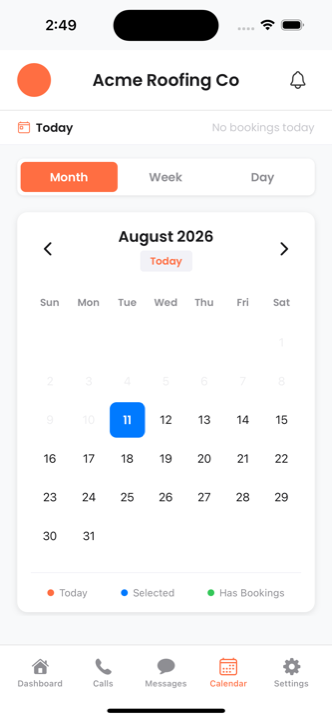
Calendar
Bookings the AI made for you
Jobs the agent booked land on your calendar without anyone typing them in. Check today at a glance, then switch between month, week, and day to see how the diary is filling up.
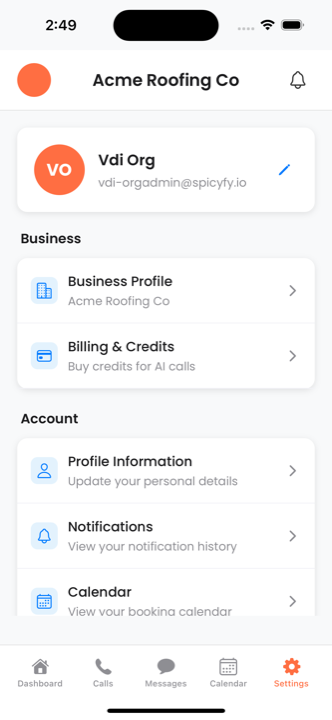
Settings
Your business, without the laptop
Update the business profile the agent speaks from, top up the credits that pay for calls, fix your own details, and work back through your notification history - all from the phone.
Everything You Need, On the Go
Run your AI agent from a van, a job site, or your couch. No laptop needed.
Live Call Activity
See calls happening in real time, who's calling, and what the AI is handling right now. Watch your business run itself.
Push Notifications
Instant alerts for new bookings, urgent calls routed to you, missed callbacks, and revenue milestones. Never miss what matters.
Call Recordings
Listen to any call recording on the go. Review how the AI handled tricky situations, train it better, and QA from anywhere.
Lead Approval
Approve, decline, or reassign leads with a tap. Review lead details, call summary, and sentiment score before deciding.
Revenue Dashboard
Today's calls, bookings, conversion rate, and revenue impact - all in a clean mobile dashboard. Check your numbers anytime.
Quick Actions
Pause AI, toggle call forwarding, update your hours, or add a quick knowledge update - all from your phone in seconds.
Built for Business Owners in the Field
HVAC techs, plumbers, electricians, roofers - they're on ladders, under sinks, and in attics. They can't log into a dashboard. The Voiceyfy app is designed for one-hand operation with large touch targets and glanceable summaries.
No Voice AI Competitor Has a Native App
Frequently Asked Questions
Does Voiceyfy have a mobile app?
Yes. Voiceyfy offers a native mobile app for both iOS and Android. Business owners can see live call activity, get push notifications for bookings, listen to recordings, approve leads, and view revenue dashboards - all from their phone. The app is free with every plan.
Do other AI voice platforms have mobile apps?
No. Retell AI, Vapi, Synthflow, and Bland AI are all web-dashboard only. Voiceyfy is the only AI voice agent platform with a native iOS and Android mobile app designed for business owners on the go.
Can I manage my AI agent from my phone?
Yes. The Voiceyfy mobile app lets you pause the AI, toggle call forwarding, update business hours, add knowledge base entries, review calls, and approve leads - all from your phone with one-hand operation and large touch targets.
Does the Voiceyfy app cost extra?
No. The mobile app is included free with every Voiceyfy plan, on both iOS and Android, with no per-user charge. Sign in with the same account you use on the web dashboard.
Your Business, In Your Pocket
The Voiceyfy mobile app is free with every plan. Download now.
Free with all plans • No credit card required • 14-day free trial